Agent SDKs: what you are buying
This block sorts the tools that sit around the agent loop by what each one takes over, and shows what none of them does for you.
Northwind now wants a triage agent that passes refund cases to a specialist. One engineer proposes the OpenAI Agents SDK, another the Claude Agent SDK, a third FastMCP. They are arguing about three different things.
A switchboard operator
So far you have answered the colleague's phone calls yourself. Now picture hiring a switchboard operator. She reads the notepad aloud, carries out requests from your approved list, transfers calls to other departments and logs every call. The approved list and the rules about what may be done are still yours, and she does not know whether the customer's problem got solved. She knows when the call ended.
An agent SDK is that operator. Follow one tool call to see which product sits where.
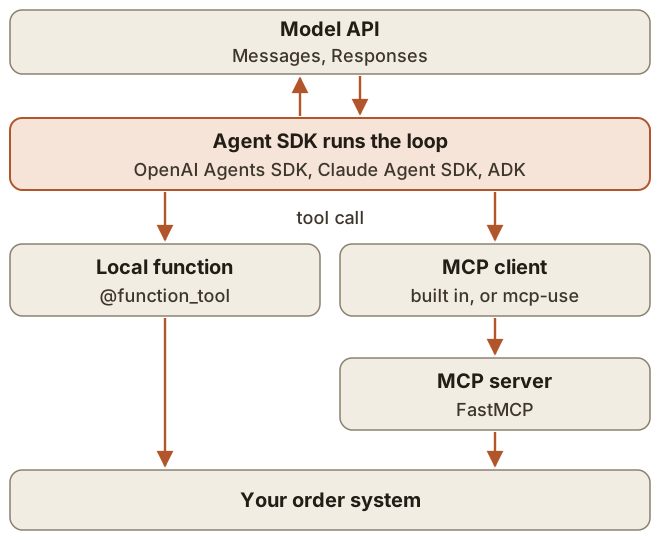
Tool | Layer | What it takes over |
|---|---|---|
OpenAI Agents SDK | Loop in your process | Turns, tool dispatch, handoffs, guardrails, sessions, tracing |
Claude Agent SDK | Harness: a library that runs the Claude Code binary | The loop plus built-in file and shell tools, permissions, hooks, sessions |
Google ADK, Vercel AI SDK | Loop in your process, like the first row | The loop and context management, each through its own API |
FastMCP | MCP server and client | Schema from your function, validation, transport, auth |
mcp-use | Agent and client on top of MCP | |
The words are not settled. LangChain's docs call the Agents SDK a framework and the Claude Agent SDK a harness, yet the Agents SDK now has sandbox agents with real workspaces too.
The earlier loop, handed over
Here is the Northwind agent on the OpenAI Agents SDK. We ran this on version 0.24.0 with a stub model.
async def over_limit(ctx, params, call_id) -> bool:
    return params["amount_cents"] > 20000

@function_tool(needs_approval=over_limit)
def issue_refund(ctx: RunContextWrapper[Session], order_id: str,
                 amount_cents: int) -> str:
    """Refund part or all of an order."""
    return refunds.issue(ctx.context.customer_id, order_id, amount_cents)

refunds_agent = Agent(name="Refunds", instructions=REFUND_RULES,
                      tools=[issue_refund])
triage = Agent(name="Triage", instructions=TRIAGE_RULES,
               handoffs=[refunds_agent])

result = await Runner.run(triage, "Order 4417 arrived broken",
                          context=session, max_turns=8)
Runner.run is your for loop. It calls the model, runs tools and appends results. max_turns is 10 by default, and going over it raises MaxTurnsExceeded, which your code has to catch or pass to error_handlers.
The schema comes from the signature. The SDK reads the type hints and the docstring. It leaves out a first parameter typed RunContextWrapper, so the customer's identity still comes from your session and the model cannot set it.
The docstring is text the model reads, so treat it as a prompt. FastMCP does the same on the server side. This is the real tools/list entry from a FastMCP 4.1.7 server, trimmed:
{
  "name": "lookup_order",
  "description": "Look up one order. Use the number the customer gave, digits only.",
  "inputSchema": {
    "type": "object",
    "properties": {
      "order_id": {
        "type": "string"
      }
    },
    "required": [
      "order_id"
    ]
  }
}
A pause is a saved string. When over_limit is true, the run stops and result.interruptions lists the call. You store result.to_state().to_string(), and later load it with await RunState.from_string(triage, saved, context_override=session), call state.approve(...) and run again. When we left out context_override, the resumed tool failed on reading the customer. The SDK logged a warning, but no exception reached our code. The model just received An error occurred while running the tool. Please try again.
The Claude Agent SDK has a different shape, because it comes with hands of its own. It fits a job such as fixing a failing test in Northwind's repository, and fits the customer chat less well.
options = ClaudeAgentOptions(
    allowed_tools=["Read", "Glob", "Grep", "Bash(pytest *)"],
    permission_mode="acceptEdits",
    max_turns=30,
    max_budget_usd=2.0,
)
async for message in query(prompt="Fix the failing tests in refunds/",
                           options=options):
    if isinstance(message, ResultMessage):
        print(message.subtype, message.total_cost_usd)
allowed_tools and permission_mode are what let it act: in the default mode, a tool call that needs approval is denied when no allow rule covers it and you supplied no callback. On version 0.2.180 we removed those two options and ran the same prompt. Edit was denied, the file did not change, and the result still had the subtype success. The denials are listed in permission_denials.
Without limits it runs until Claude finishes on its own. At max_turns the result has the subtype error_max_turns, at max_budget_usd it has error_max_budget_usd, and query() then raises an exception after yielding that result.
Transfer or consult
On the phone you can transfer a caller to the refunds desk, and from then on the caller talks to them. Or you can put the caller on hold, ask the refunds desk yourself, and come back with the answer.
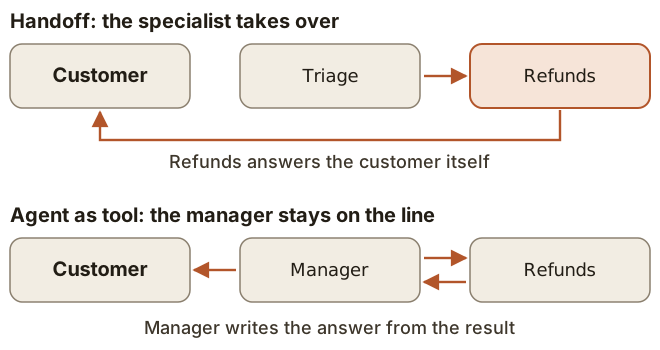
Choose a handoff when the specialist should answer directly and the prompts should stay narrow. Choose Agent.as_tool() when one agent must own the final answer or combine several specialists.
Where the checks actually run
A guardrail sounds like a check on everything. In the Agents SDK each kind runs at particular points.
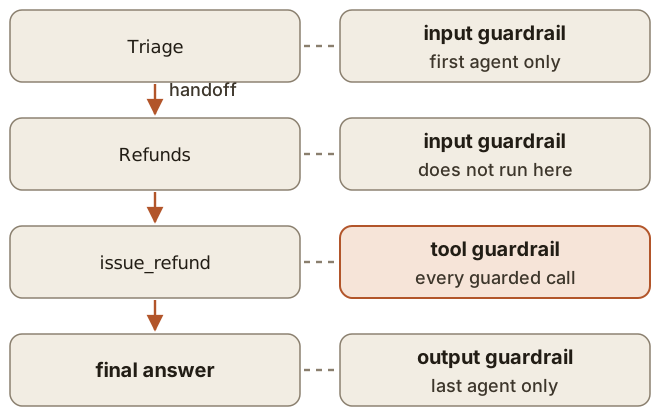
Input guardrails run in parallel with the agent by default, so the agent may already have called tools by the time the guardrail stops the run. Set run_in_parallel=False to block first. Tool guardrails do not cover handoffs or hosted tools, the ones that run on OpenAI's side, such as WebSearchTool. With needs_approval, a tool's input guardrail runs after the approval by default.
By default, the OpenAI Agents SDK and the Claude Agent SDK end the loop when the model answers with no tool calls. The OpenAI docs say the loop "continues until the task is complete", but the rule they give for a final output is text with no tool calls. Nothing has confirmed that the refund happened, as the block on false success showed.
What you pay
Anthropic warned in 2024 that framework layers can hide the prompts and responses and make debugging harder. OpenAI's docs draw the line themselves: use the Responses API directly when you want to own the loop, or when the job is short-lived and mainly returns the model's response, and use the SDK when you want the runtime to manage turns, tools, guardrails, handoffs or sessions.
You also take on the release pace. In the 12 months to 10 November 2026, PyPI shows 84 releases of openai-agents, still at 0.x, 144 of claude-agent-sdk and 74 of fastmcp, patches included, and for fastmcp 19 pre-releases too. Pin versions and read the changelog before upgrading.
Conclusion
- Ask which layer a tool occupies before comparing it with another.
- Start with the raw loop. Move when turns, handoffs, sessions and tracing start repeating in your code.
- Know where each guardrail runs, and verify the outcome yourself: the loop only knows that the model stopped asking for tools.