One step of an agent loop
A language model can only do one thing: read text and write more text. It cannot open your database, send an email or issue a refund. Yet an agent does all of that. This block shows how, one step at a time.
Your team at Northwind Goods is building a support agent. A customer writes: "Order 4417 arrived broken, I want my money back."
Think of a colleague on the phone
Imagine a smart colleague who can only talk to you by phone. They cannot touch your computer. So they say: "Please look up order 4417 and read me what you see." You look it up, you read it out, and they tell you what to do next.
A model works the same way. You are the hands. In an agent, "you" is the program you write around the model.
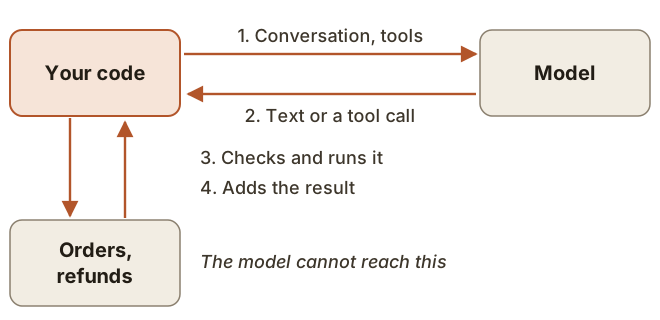
One step, slowly
You send the customer's message and a list of tools the model may ask for.
The model replies with a request. Nothing has happened yet. This is only text in an agreed format:
{
  "type": "tool_use",
  "id": "toolu_01",
  "name": "lookup_order",
  "input": {
    "order_id": "4417"
  }
}
Your code reads that request and decides whether to allow it. If it does, it runs the real database query.
Your code adds the model's reply and the result to the conversation and sends everything to the model again.
The model reads the result and either asks for another tool or writes the final answer. When a reply asks for no more tools, the loop is over.
A tool call is a request, not an action. Anything your code does not check before running it, nobody checks.
There is one exception: tools the provider runs itself, such as Anthropic's built-in web search. Those run on its servers. Everything that touches your systems runs in your code.
Press through one run yourself:
Step through one run
Conversation sent on the next call
- user: What is the weather in Oslo?
Your code sends the conversation to the model.
Why the whole conversation travels every time
Back to the phone. This colleague forgets the entire call the moment you hang up. So each time you ring back, you first read out everything said so far.
By default, the Anthropic Messages API and OpenAI Chat Completions work this way. Each request stands alone, so your code sends the whole history each time. On the second call the model knows about the broken order only because you sent it again.
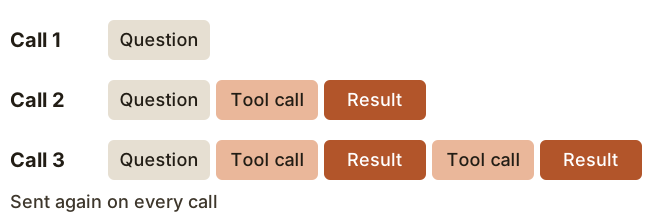
This has a price. You pay for those input tokens again on every call, so long runs get expensive faster than they get long. A later block returns to this. OpenAI's Responses API can store the history for you through previous_response_id, but the stored turns still count as input you pay for.
Conclusion
- The model writes requests. Your code does the work.
- One step is: send, read the request, check it, run it, add the result, send again.
- The model remembers nothing between calls, so the whole history goes with each one.