Durable agent: checkpoints and resume
This block explains what survives when the process running an agent dies partway through, and what happens to steps that had already touched the outside world.
A $420 refund at Northwind needs a manager's approval. The run has six steps: look up order 8890, check the policy, email the customer that the refund is under review, wait for approval, refund, confirm. At 18:00 the run reaches the wait. At 02:00 the server restarts for a deploy. At 09:00 the manager approves.
The process is gone, along with its variables, the message history it held in memory and the knowledge of which steps were finished. Without help, the run is lost, or it starts over and emails the customer again.
The notebook
Your colleague on the phone has you doing errands, and you keep a notebook. Each time you finish one, you write a line: what you did and what came of it. You go home sick. The next person on shift opens the notebook, sees three finished lines, does not repeat them and picks up at line four.
Durable execution is that notebook, plus something that hands it to the next shift. The runtime records progress outside the process, and a new process continues from the record.
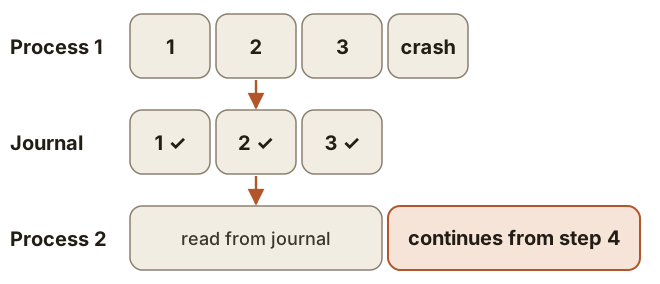
The smallest version:
def step(run_id, name, fn):
    saved = journal.find(run_id, name)    # a database table
    if saved is not None:
        return saved.result               # finished before: fn does not run
    result = fn()
    journal.write(run_id, name, result)
    return result
The moment between doing and writing
Look at the two lines after the if. You post a letter, and you collapse before writing the line in the notebook. The next shift sees no line and posts the letter again.
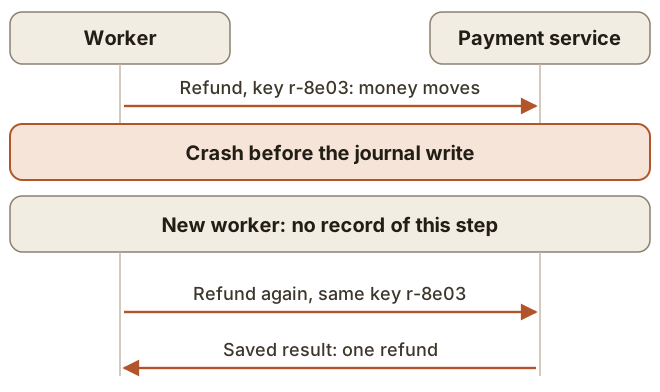
Writing the line first does not help. A crash after the write would then skip a refund that never happened. So recording after the work is the usual choice, and this order gives the guarantee called at-least-once: every step runs one or more times.
A step with an effect therefore has to be safe to repeat. For a payment that means the idempotency key from the timeouts block, and the key must be saved before the attempt. If the step creates a fresh key each time it runs, the second run sends a different key. Temporal likewise recommends that its Activities be idempotent, and LangGraph tells you to design nodes so that re-execution is safe.
One word, two meanings
"Replay" means different things in two systems you may meet.
| Temporal | LangGraph |
|---|---|---|
What is saved | Event History of the Workflow, including Activity results | A checkpoint of graph state at each super-step |
After a crash | Workflow code runs again and is checked against the history | |
"Replay" means | Normal recovery. Activities stay outside the replay path | Starting from an earlier |
Rule for your code | Workflow code must be deterministic. Put API and LLM calls in Activities, and take time and random numbers from the SDK's replay-safe APIs | Checkpoints sit between super-steps, so a node may run again from its first line |
A pause inside a node
LangGraph's interrupt() pauses a run for a person. On resume, the node starts again from its beginning, so any code above the interrupt() runs a second time.
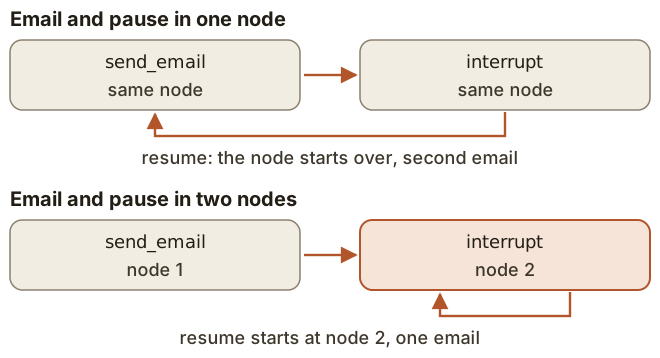
Move the effect out of the pausing node:
def notify(state):
    send_email(state["order_id"], template="refund_under_review")
    return {"notified": True}

def approval(state):
    decision = interrupt({
        "order_id": state["order_id"],
        "amount_cents": state["amount_cents"],
    })
    return {"approved": decision}
The answer arrives later as graph.invoke(Command(resume=True), config) with the same thread_id. Wrapping the effect in a LangGraph task also works, because completed tasks return stored results. The email itself can still repeat after a crash, as any step can.
Where the notebook is kept
A notebook left in the process dies with it. LangGraph's InMemorySaver keeps checkpoints in RAM, and a restart loses them. Production needs a persistent checkpointer such as PostgresSaver.
LangGraph also lets you choose when the notebook gets written:
| When it writes | A crash mid-run |
|---|---|---|
| Only when the graph exits | Intermediate state is lost |
| While the next step runs | Small risk of a missing checkpoint |
| Before the next step starts | Every checkpoint is written, at some cost in speed |
A pause can last days
Do not keep a process alive for the manager. The state sits in the database, and the answer comes in through Command(resume=...) or, in Temporal, a Signal.
The world moves on meanwhile. By 09:00 a colleague may have refunded order 8890 by hand. So after a long wait, read the order, the refundable amount and the approver's rights again.
The code may also have changed. LangGraph resumes with saved state and the graph you compile now. In Temporal, changing a Workflow Definition that running executions depend on can produce a non-determinism error, which is what its versioning tools exist for.
Durable execution protects you from a dead process. The model's context window still fills up on a long run, and that is a separate problem.
Conclusion
- A run survives a crash when its progress is recorded outside the process.
- A crash between the effect and the record repeats the step, so every step with an effect must be safe to repeat, usually with a stored idempotency key.
- Check what "replay" means in your engine, and keep effects away from code that re-runs.
- After a long pause, re-read what may have changed.