The loop in code
This block turns the phone call from the previous block into code. We go through the loop line by line, then look at what happens when the model asks for two things at once and when a tool fails.
We are still building the Northwind support agent, directly on the Anthropic Python SDK.
The phone call as a function
You dial, read out the whole conversation and listen. If your colleague asks for something, you do it and ring back. If they give you a final answer, you are done.
def run_agent(client, session, text):
    messages = [{"role": "user", "content": text}]
    for _ in range(MAX_STEPS):
        reply = client.messages.create(model=MODEL, max_tokens=1024,
                                       system=SYSTEM, tools=TOOLS,
                                       messages=messages)
        messages.append({"role": "assistant", "content": reply.content})
        if reply.stop_reason == "end_turn":
            return text_of(reply)
        if reply.stop_reason != "tool_use":
            return HANDOFF_MESSAGE
        results = [execute(block, session) for block in reply.content
                   if block.type == "tool_use"]
        messages.append({"role": "user", "content": results})
    return HANDOFF_MESSAGE
Here is what each part does.
messages is your notepad. It starts with the customer's message and only ever grows.
client.messages.create is the call. You send the instructions, the list of tools and the whole notepad.
The first append writes down what your colleague said. The reply goes in whole, before you do anything about it.
end_turn means they are finished, so you return the text. This agent has no server tools or stop sequences, so any other reason, such as max_tokens or refusal, means there is no complete answer, and the customer goes to a person.
results is you doing what was asked. Every request gets run, and the second append puts all the answers into one message.
range(MAX_STEPS) is the limit on the call. The next block is about that limit.
Two requests at once
Your colleague can ask for two things in one breath. So they number each request, and you quote the number when you answer. Otherwise the answers get mixed up.
A customer asks about orders 4417 and 5120. One reply from the model holds two lookups, so your code always goes through a list, even when there is usually one item.
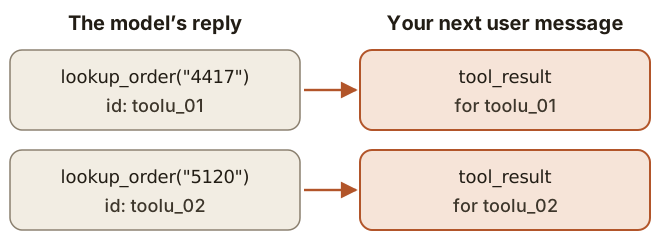
Three rules apply on Anthropic's API:
- Every
tool_usegets atool_result, and eachtool_resultnames its call throughtool_use_id. - The results go in the very next message. Nothing may come between.
- If you decide to skip a call, you still answer it, with
is_errorset.
The order of execution is yours. Independent reads can run together. Refunds are better one at a time.
Other APIs use the same idea with different names:
| Anthropic Messages | OpenAI Responses | OpenAI Chat Completions |
|---|---|---|---|
Model asks | | | |
The number | | | |
You answer | | | message with role |
When a tool fails
Your colleague asks you to find order 4471, and there is no such order. You say so, and they ask the customer for the right number. You would not hang up on them.
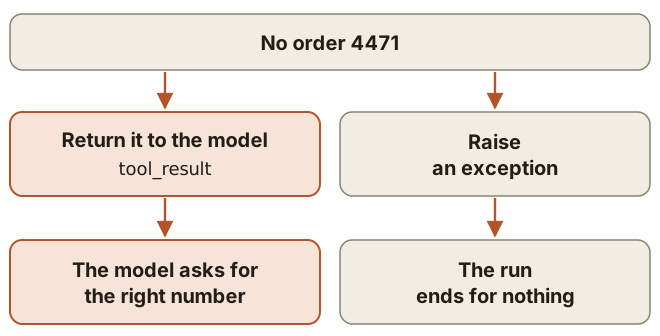
An unknown order is information, so it goes back to the model as a tool result:
def execute(block, session):
    result = {"type": "tool_result", "tool_use_id": block.id}
    try:
        result["content"] = dispatch(block.name, block.input, session)
    except Exception as error:
        result["content"] = f"Failed: {error}"
        result["is_error"] = True
    return result
Make the text specific enough for the model to choose what to do next.
What the model does not get to say
Your colleague does not tell you who the customer is. You already know that from the signed-in session.
The customer's identity is not a tool argument. customer_id stays out of the tool schema, and dispatch reads it from session.
if name == "lookup_order":
    return orders.lookup(order_id=args["order_id"],
                         customer_id=session.customer_id)
Models can invent arguments, and OpenAI's reference warns about parameters outside your schema. Strict mode makes arguments match the schema. It says nothing about whether the values are right, so your code validates them and dispatch passes on only the fields it expects.
Conclusion
- Write the reply into the history whole, then answer every call by its id, all in one message.
- Return failures as results, so the model can react.
- Take the customer's identity from the session.